
Install and first run
From zero to a tinted page in two minutes.
From zero to a tinted page in two minutes.
1. Install
Option A: Chrome Web Store (recommended)
Open the Turan listing → click "Add to Chrome" → done.
 Turan — gradient page beautifier for Chrome
Option B: load an unpacked extension
If you have a zip archive:
- Unpack it into any local folder
- Open
chrome://extensions/ - Turn on Developer mode in the top right
- Click "Load unpacked" and pick the unpacked folder
It is worth pinning the icon to the toolbar: click the puzzle icon in the toolbar → find Turan → click "Pin".
2. Up and running in 60 seconds
Once installed the extension is zero-configuration: it is on by default with Green Field Warm Sun for daytime and Dawn Eye Care for the evening. Open any page and you will see the result.
From there, three things are worth adjusting to taste:
Step 1: pick a scheme Click the toolbar icon → "Current scheme" → choose from the swatches. Every entry shows a gradient swatch, so you know what it looks like before clicking.
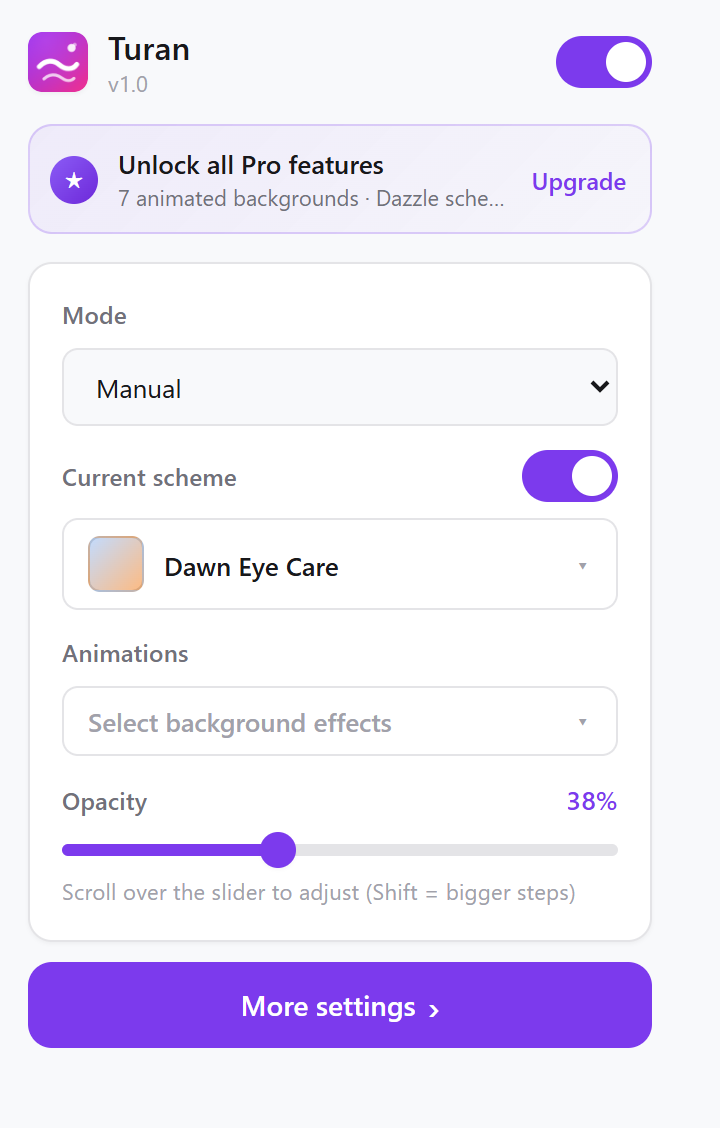 The toolbar popup
Step 2: set the opacity Drag the opacity slider; 30–50% is the comfort zone for most people. The slider responds to the mouse wheel (Shift for larger steps).
Step 3: turn on an effect (optional) Click "Animated backgrounds" → tick the effects you want; several can run at once.
3. What the popup does, what the settings page does
Toolbar popup (frequent actions, one screen)
| Item | What it does |
|---|---|
| Master switch | Pauses every effect at once |
| Mode | Manual / Scheduled |
| Current scheme | Visual swatch picker |
| Apply scheme toggle | Leaves the colour layer off but keeps animated backgrounds |
| Animated backgrounds | Multi-select from the 9 effects |
| Opacity | Slider, with mouse-wheel nudging |
| Detailed settings | Jump to the full settings page |
Detailed settings page (seven tabs, every detail)
| Tab | Contents |
|---|---|
| Home | Master switch, mode, scheme, animated backgrounds, opacity, with live preview |
| Schemes | The 17 built-ins, create / edit / delete, restore hidden presets |
| Schedule | Time-slot rules |
| Animations | Parameters and colours for the 9 effects, with live preview |
| Site rules | Whitelist, per-site schemes |
| Import / export | JSON backup and sharing |
| About | Version, languages, privacy policy |
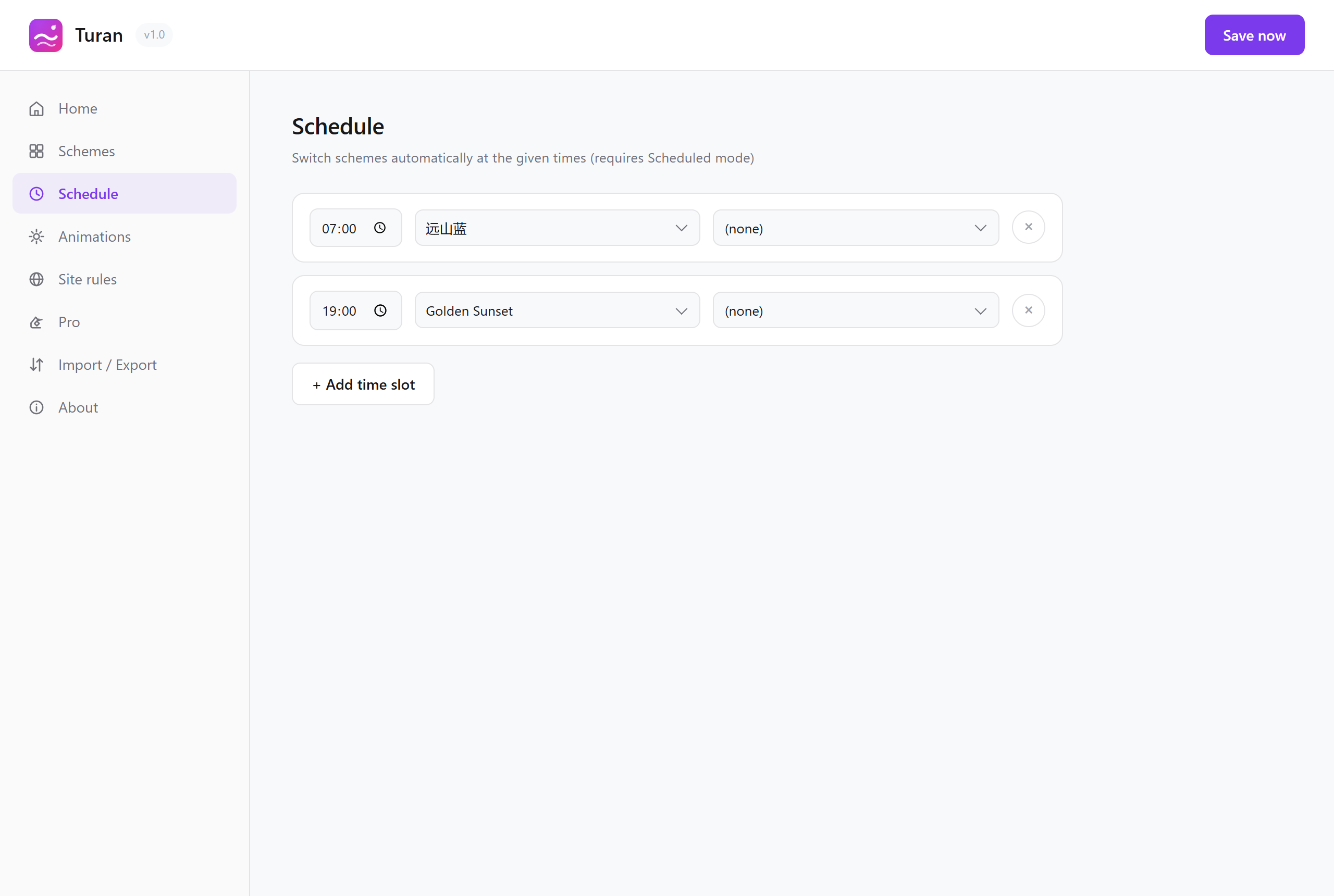 Detailed settings — the Schedule tab
4. Two switches, do not mix them up
| Switch | What turning it off does |
|---|---|
| Master switch (top of the popup / top of the settings home) | Stops the colour scheme and the animated backgrounds; the page returns to its original look |
| Apply scheme | Removes only the colour layer, while animated backgrounds keep playing |
So "snow, but no tint" is entirely possible.
5. Turning the effect off for one site only
The fastest route: add the site to the whitelist (Settings → Site rules → Whitelist) and it stays untouched from then on.
If you only want a break, flip the master switch at the top of the popup instead.
6. Which browsers are supported
- Chrome and all Chromium-based browsers
- Chromium 86 or newer is enough (Turan deliberately avoids newer browser features)
- Requires MV3 (Manifest V3) support
7. UI languages
Seven are supported: 简体中文, English, 日本語, Français, Deutsch, 한국어, Русский.
The UI language follows your browser's UI language automatically; there is no manual switcher. Traditional Chinese (zh-TW / zh-HK) falls back to Simplified Chinese, and unsupported languages fall back to English.
Read next